 Zcom Network Services
Zcom Network Services
Zcom Network Services
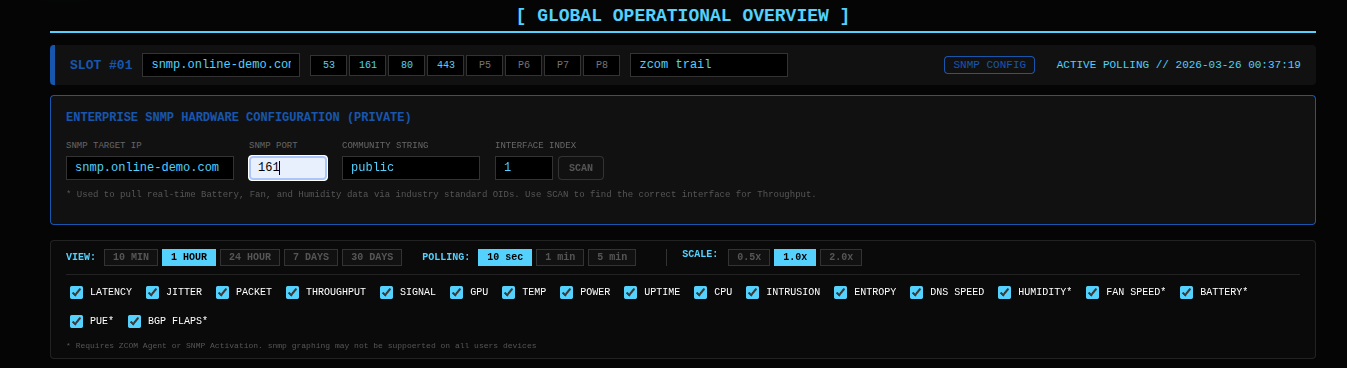
To ensure all 18+ telemetry graphs (Latency, Jitter, Packet Loss, etc.) show accurate real-time data, please ensure your network equipment and firewalls are configured with the following parameters:
For maximum fidelity and zero-firewall telemetry, we recommend implementing the ZCOM Heartbeat Agent or advanced Net-SNMP extensions.
Add these OIDs to your /etc/snmp/snmpd.conf to unlock advanced system metrics:
Use the SCAN button in the SNMP Configuration panel to automatically detect and map your primary internet interface for 100% accurate throughput graphing.
For servers behind strict firewalls, use this push-based agent to inject metrics directly into the NOC:
import requests, psutil, time
# Strategic Heartbeat Agent
while True:
    m = {"cpu_usage": psutil.cpu_percent(), "status": "ONLINE"}
    requests.post("https://zcomnetworkservices.com/api/agent/push",
                  json={"order_id": "YOUR_ID", "slot_index": 0, "metrics": m})
    time.sleep(60)
For comprehensive monitoring, please permit the following traffic patterns on your edge security gateway:
| SERVICE | PORT | PROTOCOL | DASHBOARD METRIC |
|---|---|---|---|
| ICMP (ECHO) | N/A | ICMP | Latency, Jitter, Loss |
| SNMP | 161 | UDP | Battery, Fan, Temp, CPU |
| WEB (HTTP) | 80 | TCP | Heartbeat, Response Time |
| WEB (HTTPS) | 443 | TCP | Heartbeat, SSL Verify |
| DNS | 53 | TCP+UDP | DNS Speed, Query Auth |
| SSH | 22 | TCP | Link Integrity |
| SMTP | 25 | TCP | Mail Relay Health |
| RDP / VPN | 3389 / 1194 | TCP / UDP | Remote Access Uplink |
The ZCOM Dashboard utilizes simultaneous data streams to populate all 18+ graphs:
Our engineers are on standby to assist with failover triggers and endpoint configuration.